Product
One platform, three product families.
Agents run the conversation, Assist supports your team, Intelligence understands the outcome. All three work on the same interaction foundation, the same voice and telephony layer and the same integrations.
Buy outcomes, not infrastructure.
Autonomous AI agents that interact directly with customers and perform business tasks. The actions an agent may perform and the systems it may write to are defined up front; requests outside that boundary are handed over to your team.
Packaged agents
Each agent owns a specific job end to end and works on the channels you need.
AI Receptionist
Answers incoming calls, handles common questions and routes the request to the right place.
What it does
- Answers incoming calls and greets customers
- Understands basic requests and answers common questions
- Captures contact information
- Routes requests and transfers to your team when needed
- Works outside business hours
Who it is for
- Local businesses
- Professional services
- Clinics
- Offices
- Hospitality
- Service businesses
Appointment Agent
Takes appointment requests, checks availability, books and changes appointments.
What it does
- Answers appointment requests by phone or digital channels
- Checks availability
- Books, reschedules, cancels and confirms appointments
- Sends reminders and answers appointment questions
- Escalates exceptions to your team
Who it is for
- Clinics
- Doctors
- Dentists
- Salons and barbers
- Repair businesses
- Consultants
- Service providers
Support Agent
Answers common support requests with business knowledge and escalates complex cases with their context.
What it does
- Answers common support requests using business knowledge
- Identifies customers where required
- Retrieves account or case information and performs supported actions
- Creates or updates tickets
- Escalates complex cases with the handoff context preserved
Who it is for
- Software companies
- E-commerce
- Utilities
- Service providers
- Retail
- Subscription businesses
Sales Agent
Responds to inbound leads, qualifies customers and moves the opportunity to the sales team.
What it does
- Responds to inbound leads and qualifies them
- Answers product questions and collects lead information
- Schedules sales appointments
- Updates CRM records and performs outbound follow-up
- Escalates qualified opportunities to your team
Who it is for
- Sales organizations
- Real estate
- Automotive
- B2B services
- Financial services
- High-consideration retail
Notification and Follow-up Agent
Delivers reminders and notifications and runs follow-up workflows.
What it does
- Reaches out with outbound calls or messages
- Sends appointment and payment reminders
- Sends order notifications and service updates
- Handles renewal reminders and customer follow-up
- Runs simple confirmation workflows
Design your own agents without writing code.
Create as many agents as you need: design their behaviour, workflow and outputs on screen, and try them before they go live.
Create as many agents as you need; each takes on one business process and shares common rules.
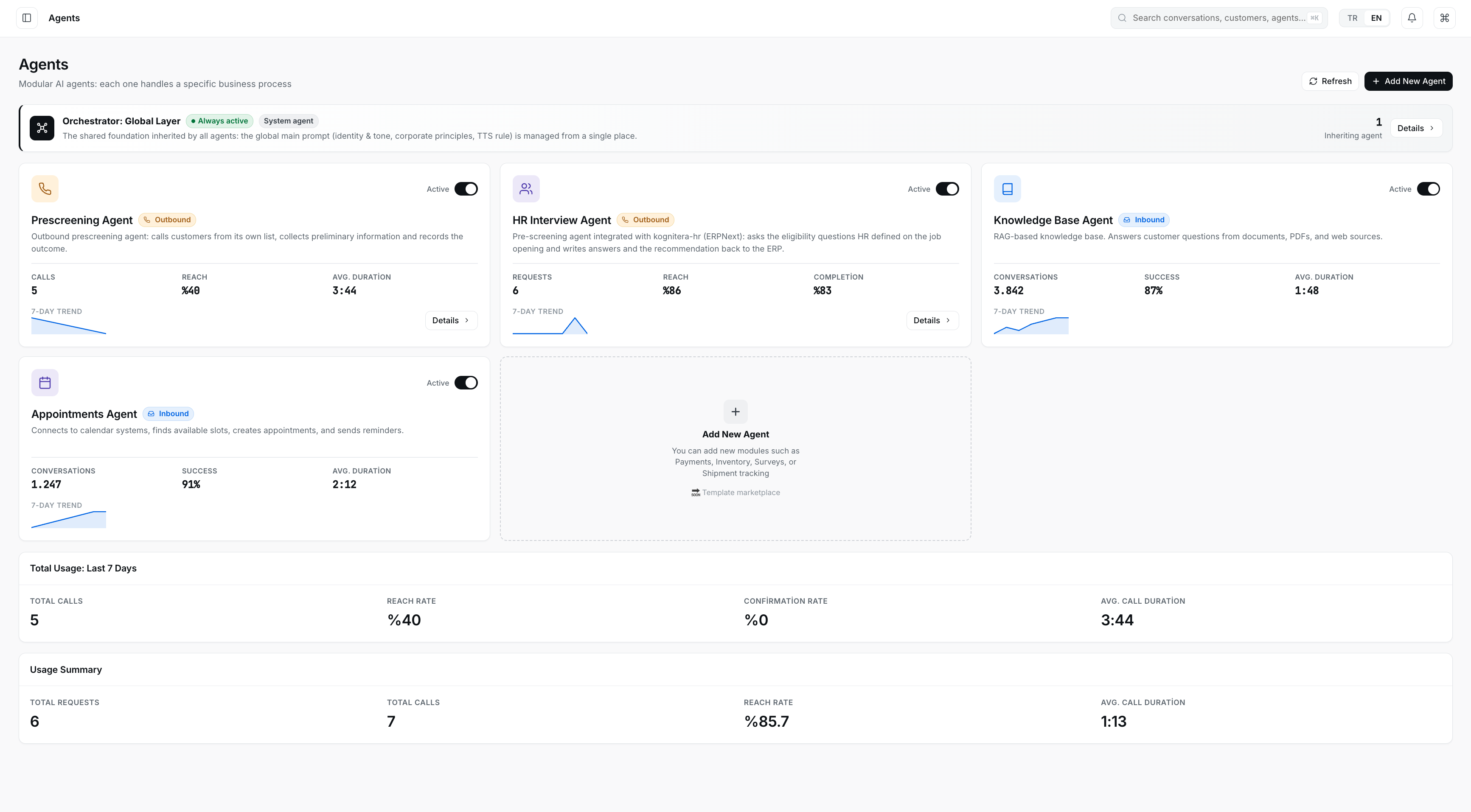
Agents
Create as many agents as you need; each takes on one business process and shares common rules.
- Common rules
- Agent connected to a business system
- New agent
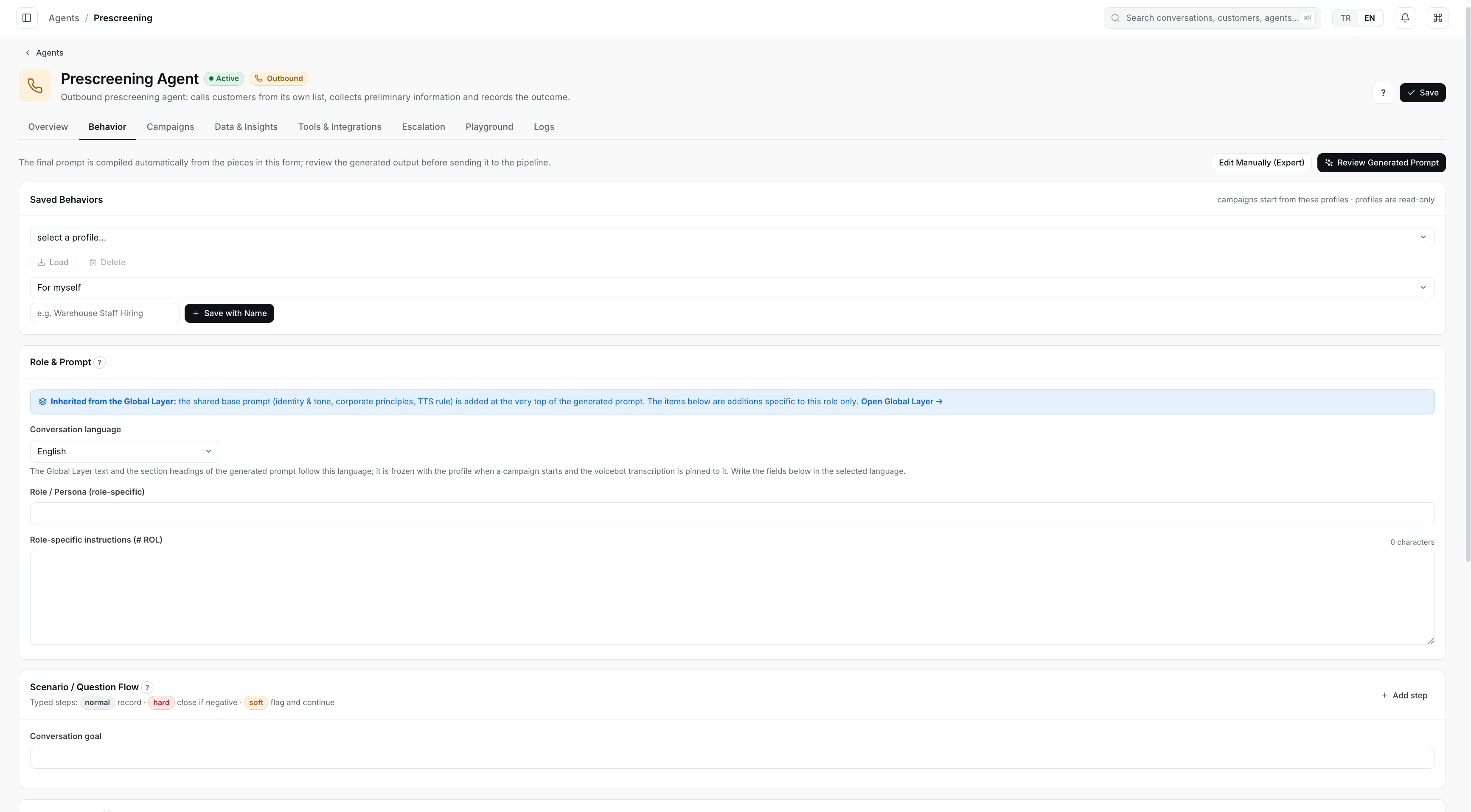
Configuration
Behavior, workflow and outputs are defined on screens without code; the resulting instructions are reviewed before going live.
- Inherited rules
- Scenario flow
- Review
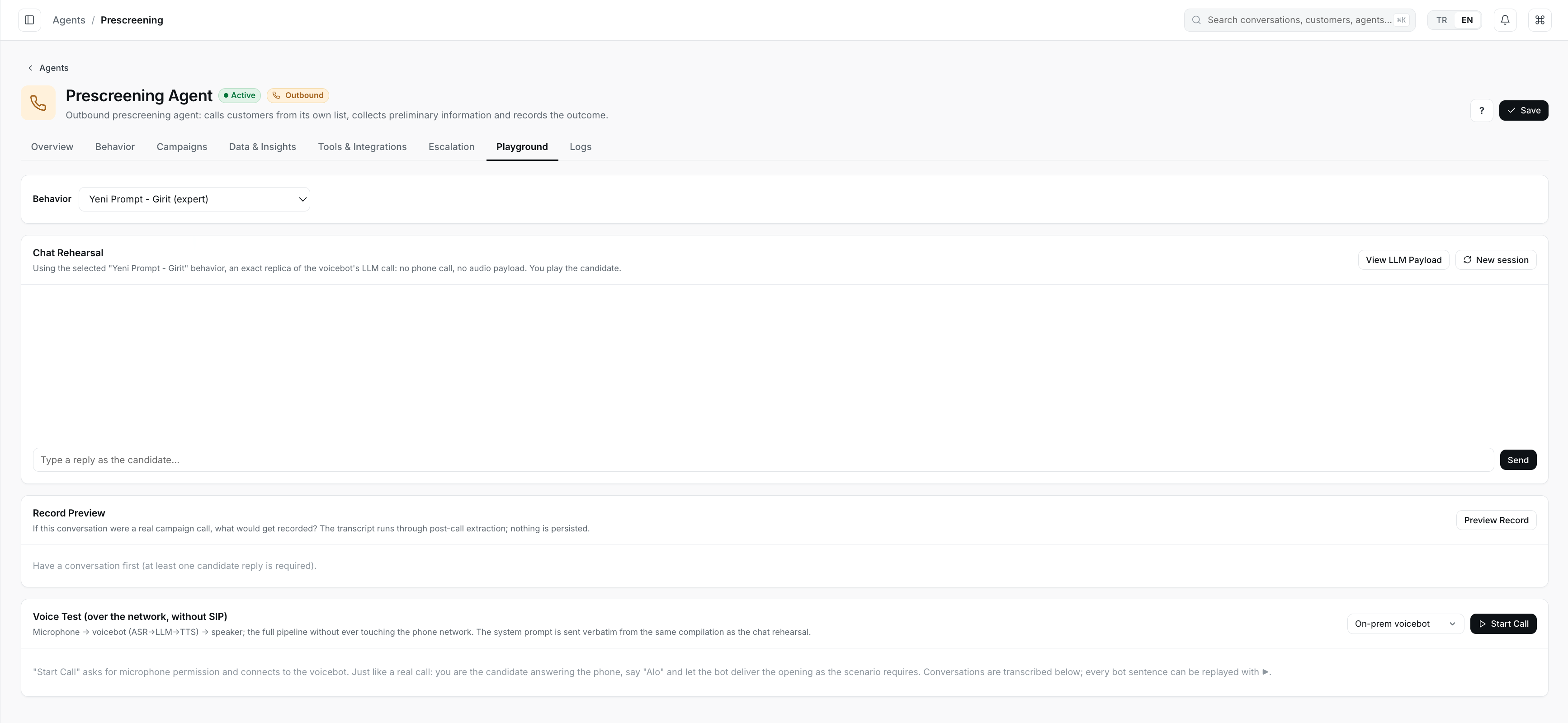
Test area
Before going live, an agent is tried in text and voice without connecting to a phone line.
- Chat rehearsal
- Record preview
- Voice test
Real product screens; sample data.
An agent's lifecycle
- Configure
- Try
- Go live
- Monitor
- Improve
Shared layer
Identity, tone, company principles and voice rules are managed in one place; every agent inherits them.
Behaviour profiles
Behaviours are saved by name; campaigns start from these profiles.
Scenario steps
The flow is built step by step, and each step has a type: record, close if negative, or flag and continue.
Expert mode
The instruction built from the screens can be reviewed and edited by hand when needed.
Record preview
The playground shows what would be recorded in a real conversation; test runs are not stored.
Knowledge base
Agents answer from documents, PDFs and web sources.
Agents working together
Several agents can take turns in one conversation; your team takes over when needed.
Built around your own processes.
Enterprise agents are configured for your business rules, your systems and your deployment choice.
- Company-specific instructions and policies
- Business-specific tools and multi-step actions
- Authentication flows
- Business rules and human handoff
- Multiple channels
- Voice and language tailored to your organization
- Company-specific knowledge sources
- Model choice
- Customer-controlled deployment
Agent operations
Manage the agent in production.
For packaged agents, Kognitera mostly runs this work; enterprise customers use it directly inside the product.
- Versions
- Test scenarios
- Simulation
- Regression sets
- Evaluations
- Business outcome tests
- Policy tests
- Live metrics
- Conversation replay
- Failure review
- Controlled rollout
- Rollback
People and AI work together.
Knowledge and a suggested response
Realtime transcription, customer context and relevant knowledge stay next to the team, with a suggested response on the same screen.
Next step and alerts
The next best action, process and compliance reminders and sentiment or risk alerts appear while the interaction is still running.
Tomorrow at 14.00 looks free. If you confirm, I will move your appointment.
- Next best actionMove the appointment and send confirmation
- Compliance reminderComplete identity verification
- Sentiment and riskNo sign of frustration
At every moment of the conversation.
Separate support while the conversation runs, when it ends and when it passes to your team.
During the conversation
While the representative talks, Assist gathers context and makes suggestions.
- Real-time transcription
- Customer identification and relevant history
- Answers from knowledge sources
- Suggested responses and next step
- Process guidance
- Compliance reminders
- Sentiment and risk alerts
- Live conversation status
After the conversation
When the conversation ends, the record work is ready.
- Automatic summary and conversation outcome
- Conversation notes
- Follow-up tasks
- CRM and ticket updates
- Commitments detected
- Open issues
At human handoff
When an AI agent hands the conversation to your team, the team takes over with:
- Conversation summary and customer request
- Verified identity information
- Completed actions
- Failed steps
- Relevant customer data
- Suggested next step
Live conversations on one screen.
The sentiment trend and takeover suggestion appear while the conversation runs; internal team notes are not shown to the customer.
Several AI agents take turns in one conversation and the team takes over when needed; customer signals and handoffs appear on the same screen.
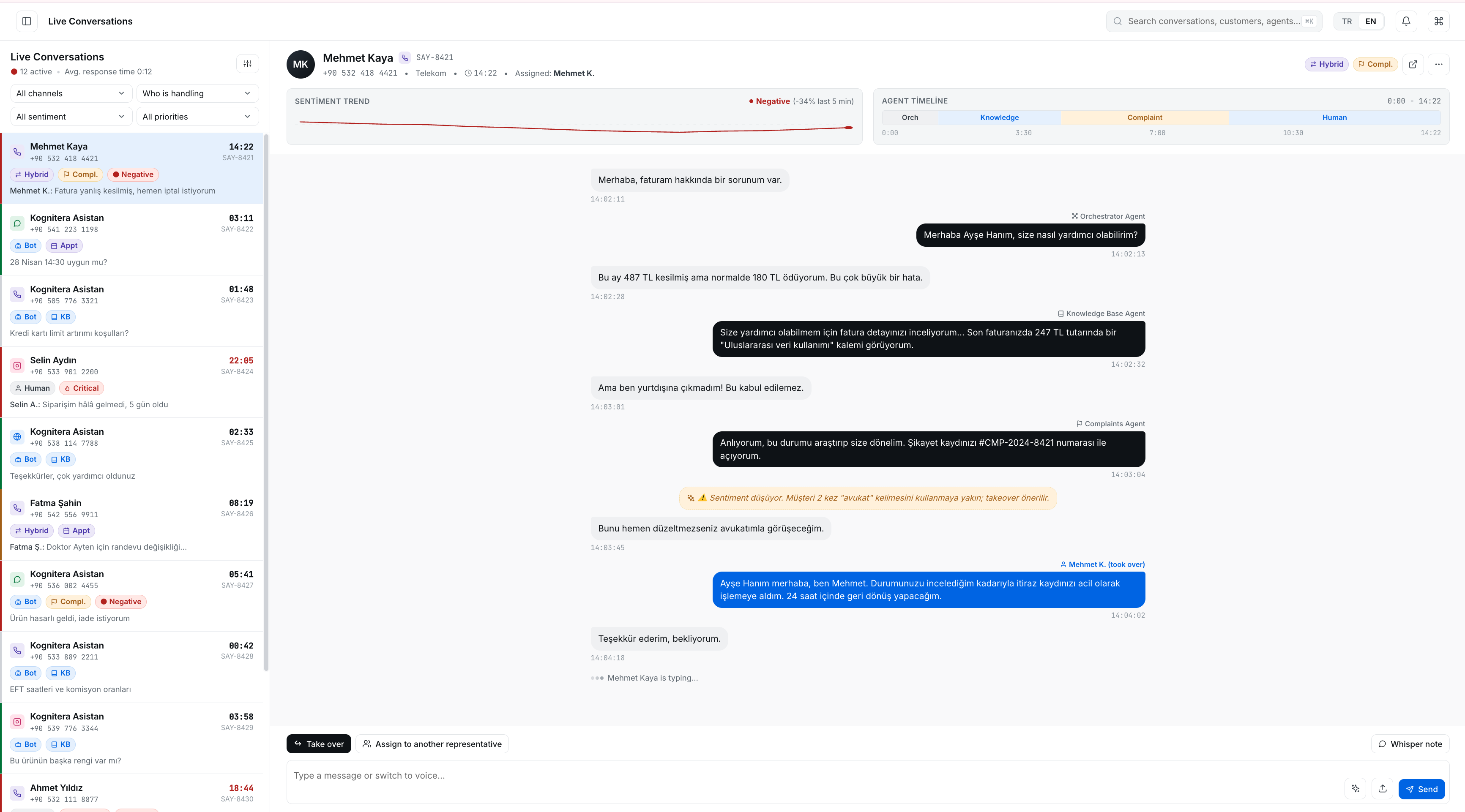
Live conversations
Several AI agents take turns in one conversation and the team takes over when needed; customer signals and handoffs appear on the same screen.
- Agents in this conversation
- Customer signal
- Human handoff
Real product screens; sample data.
Understand your customers.
Interaction analysis
Summary, outcome and frustration signals come out of every interaction; the same speech analytics also applies to passive recordings.
Automatic tagging
Intent, topic, sentiment and outcome are derived automatically for every interaction.
Automatic quality assurance (Auto QA)
Scorecards, compliance checks and required-script verification run automatically; every finding carries its explanation and stays open to human review.
Conversations become text as they are spoken, in Turkish and other languages, passive recordings included.
- Identity verification
- Appointment confirmation
- Insurance information
From conversation to insight.
Four layers draw on the same conversation evidence.
Conversation intelligence
What was discussed, why, and how it ended.
- Transcript search
- Summaries
- Intent and topic
- Sentiment and dissatisfaction
- Conversation outcome
- Trends
- Root-cause signals
Quality
Every conversation is assessed against the same criteria; the reason behind each finding is visible.
- Automated quality assurance
- Configurable scorecards
- Compliance checks and mandatory script verification
- Communication quality
- Silence and interruption analysis
- Explained findings
- Human review workflow
Customer signals
Risk and opportunity are flagged before the conversation ends.
- Satisfaction prediction
- Complaint risk
- Churn signals
- Escalation risk
- Purchase likelihood
- Cross-sell and upsell signals
AI agent performance
Where AI agents succeed and where they get stuck.
- Success rate
- Tool failure and escalation analysis
- Failed conversation clusters
- Response latency
- Policy violations
- Version comparison
- Live quality monitoring
Operations on one dashboard.
Bot-resolved rate, escalation rate, volume by channel and live events are monitored on the same dashboard.
Conversation volume, agent performance and live events are followed on one panel.
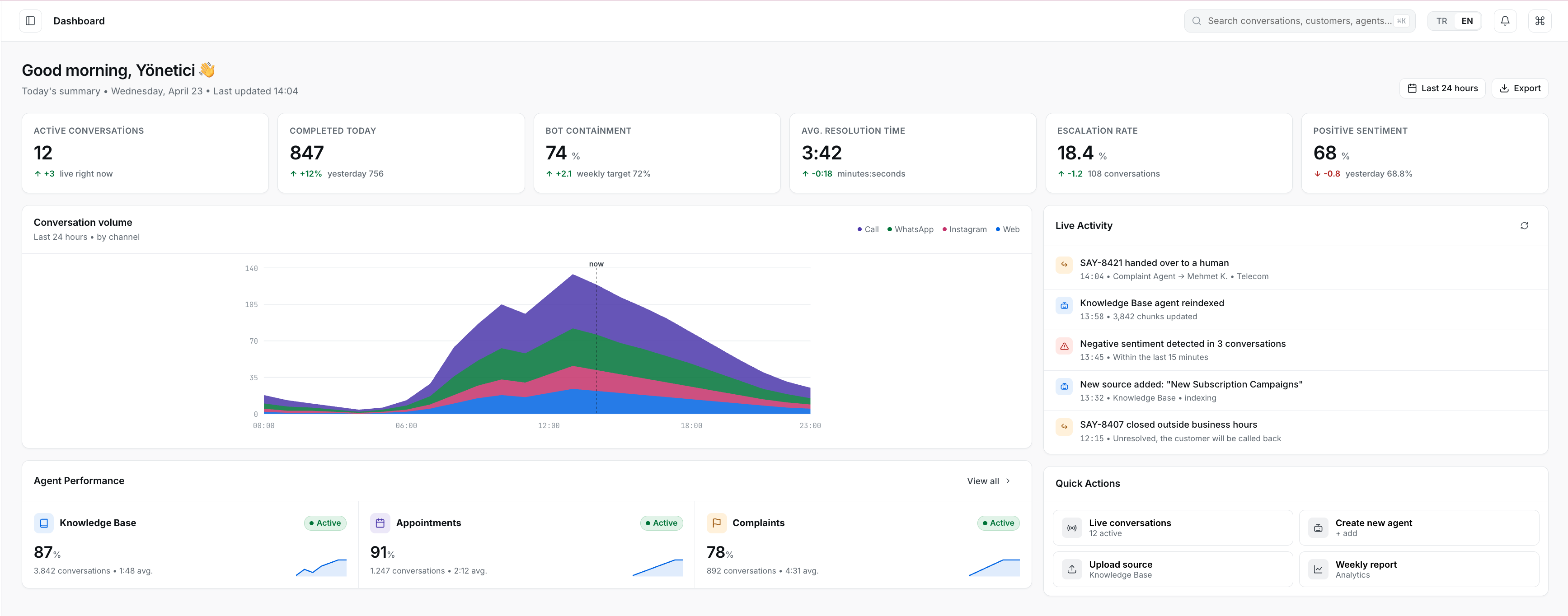
Operations panel
Conversation volume, agent performance and live events are followed on one panel.
- Volume by channel
- Agent performance
- Live events
Real product screens; sample data.
A natural conversation on the phone.
Voice is not a thin layer added to a text bot. Real-time speech recognition, speech synthesis, turn-taking and PBX connectivity are part of the platform.
Real-time speech recognition and speech synthesis in several languages, with Turkish first. Voice models also run in on-premise deployments.
Realtime transcription
The call becomes text while it is spoken.
Natural turn taking
The AI agent speaks once the other side finishes.
Interruption handling
When the customer cuts in, the agent stops and listens.
Transfer
The call moves to the right destination with its context.
Human handoff
The team takes over and the context is preserved.
The whole voice path, from speech to record.
Works with your existing PBX and contact center infrastructure; you do not need to own carrier infrastructure.
Real-time speech recognition
The conversation becomes text as it is spoken, both for the agent to understand and for analysis.
- Streaming transcription
- End-of-speech detection
- Language awareness: Turkish and multilingual
- Silence and no-speech handling
- Noisy and low-quality phone audio
- Confidence and timing information
- Replaceable recognition models
Speech synthesis
The agent speaks its answer in its own voice.
- Low perceived latency
- Configurable voices
- Language-specific pronunciation
- Speaking rate control
- Interruption and cancellation
- Replaceable speech synthesis providers
Natural conversation
When the other side starts speaking, the agent stops; it does not stop for irrelevant noise.
- Detecting that someone started speaking
- Interrupting agent speech when needed
- Ignoring irrelevant noise
- Separating generated speech from what was actually heard
- Keeping history based on what participants heard
- Events that explain interruptions
Telephony and contact center
The agent handles inbound and outbound calls; passive recording is also taken on the existing call path.
- Inbound and outbound calls
- AI- or human-controlled calls
- Passive observation and recording on the existing call path
- Integration with SIP, PBX, telephony providers and CCaaS
- Call transfer and human handoff
- Failed call handling
- Telephony metadata for diagnosis and matching
On-premise voice
Speech recognition and synthesis models also run in your own environment.
- On-premise and private cloud deployment
- Restricted-connectivity environments
- Voice quality monitoring
- Latency, capacity and error visibility
Keep the infrastructure you already have.
Kognitera does not require you to replace your communication stack; it connects to your existing telephony, messaging providers and business systems.
What it does
- Answers questions using the information in the system
- Creates and updates records
- Starts tickets and workflows
- Opens follow-up tasks
Webhooks, customer APIs and MCP-compatible tools connect to the same layer.
Kognitera is not
- A telecommunications carrier
- A VoIP provider
- Not designed as a complete CCaaS replacement
- Not designed as a CRM replacement
It is the AI interaction layer that connects these systems.
The foundation beneath all three product families.
Every product family uses the same services; adding a product does not mean rebuilding the foundation.
Interaction services
Every conversation is held in the same model.
- Interaction lifecycle
- Participant and channel identity
- Business endpoints
- Shared content model
- Customer history
- Human and AI distinction
- Handoffs and business actions
- Audit trail
Channel connectivity
Connections are modular; the channel you need is added.
- Passive voice recording
- SIP and PBX
- Active telephony
- Web chat
Administration
Who sees what, and who changes what.
- Tenants and teams
- Users, roles and permissions
- Configuration
- Credentials
- Audit
- Usage and licensing
Operations
The state of the system is monitored from one place.
- Health, capacity and latency
- Errors
- Provider, media and storage status
- Interaction traces
- AI agent and integration status
Move customer interaction forward.
The AI Customer Interaction Platform for automating, assisting and understanding customer interactions across voice and digital channels.